Hybrid retail and restaurant POS system

One POS for the retail shelf and restaurant kitchen.

Sell a bottled juice by barcode, build a smoothie with modifiers, seat a table, receive a purchase order, and read the day in one operating system. LiftedPOS gives mixed retail and food-service businesses one tenant without flattening either side of the operation.

REAL SEEDED HYBRID TENANT · RETAIL + RESTAURANT WORKFLOWS · NO CONCEPT SCREENS

Two counters, one system

Two counters. One operating record.

A hybrid POS should preserve the detail unique to retail and food service, then connect the shared consequences of the sale. The product, kitchen ticket, customer, inventory movement, employee, and report should not become separate versions of the day.

  • 01A · RETAIL SHELF Scan the shelf item

    Resolve the exact UPC, SKU, or variant, then carry its price, tax, cost, and stock identity into the cart.

  • 01B · KITCHEN MENU Build the prepared item

    Select the menu item and retain its modifiers, course, seat, and preparation notes on the source order before production handoff.

02 · ONE REGISTER Complete one sale

Keep customer, employee, discounts, tax, tips, tender, and receipt attached to the same transaction.

  • 03A · SHARED RECORD Inventory + customer + reports

    Move the product, customer, employee, location, and reporting records that should be shared.

  • 03B · SERVICE RECORD KDS + table state

    Keep prepared items connected to kitchen-display ticket state and the richer restaurant context retained on the source order.

The rail explains current product relationships. Exact modules, menus, devices, and employee permissions are configured per merchant.

Product proof

Use the retail tools and restaurant tools in the same tenant.

These are real LiftedPOS captures. The hybrid demo exposes the same operating surfaces with safe seeded data, so a buyer can verify the workflow instead of accepting a feature-grid promise.

RETAIL COUNTER

Exact products in a fast register.

Search or scan the catalog, work with variants, and keep the item connected to stock, purchasing, customer history, and reporting.

LiftedPOS register with a mixed catalog ready for checkout
Real LiftedPOS register capture. Open the hybrid demo to work the seeded catalog.
LiftedPOS product catalog with pricing and inventory context
Product records support the catalog, pricing, and inventory work behind checkout.
RESTAURANT FLOOR

Live service from the table to the kitchen.

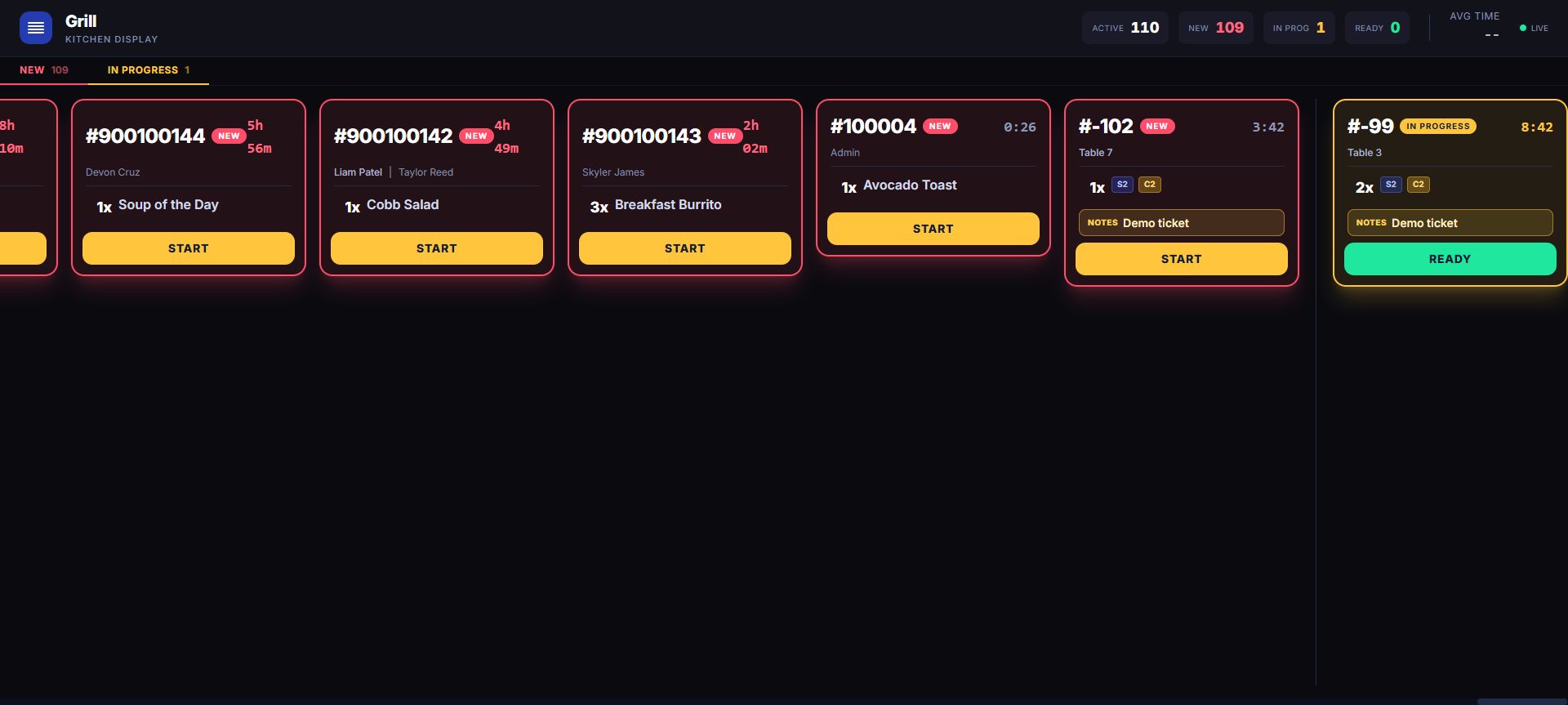
Use table context, source-order detail, QR-order intake, and station-aware kitchen display without moving the restaurant into a separate POS.

LiftedPOS restaurant floor plan with live table states
Real LiftedPOS floor-plan capture with live table states.
LiftedPOS live kitchen display with station-aware active tickets
Real LiftedPOS kitchen-display capture with active preparation tickets.

Hybrid capability matrix

Keep each workflow specific. Keep the management layer shared.

“Hybrid” does not mean adding restaurant colors to a retail register. It means the tenant can expose the tools appropriate to both operating models while preserving one company, customer, staff, and reporting context.

How LiftedPOS connects retail and restaurant work
Operating areaRetail workRestaurant workShared LiftedPOS record
CatalogUPCs, SKUs, categories, brands, variants, price, cost, tax, and stock.Menu sections, prepared items, modifiers, recipes, and component mappings.One tenant catalog can represent shelf goods and prepared products without treating every item as the same type.
CheckoutBarcode input, product search, category navigation, customer assignment, and receipts.Table, seat, course, modifier, kitchen note, tip, and local preauthorization-ledger context where configured. Any processor-backed hold is separate.The transaction retains employee, tax, discount, tender, customer, and location context.
InventoryOn-hand stock, low-stock visibility, transfers, suppliers, purchase orders, and receiving.Recipe and component inventory can connect the sold menu item to configured ingredients.Product and ingredient movement stays available to the same operating and reporting environment.
Service flowCounter and customer-display workflows focus on the next cart.Floor plan, waitlist, tables, QR ordering, tickets, and kitchen display carry service state.One staff team can move between counter and restaurant work according to role and permission.
CustomersProfiles, purchase history, loyalty, rewards, and transaction lookup.Guest context can follow a table or order while tips and service activity remain on the sale.The customer relationship does not have to restart at the boundary between shop and kitchen.
WorkforceCashier roles, register controls, refunds, inventory permissions, schedules, and time clock.Floor, kitchen, manager, schedule, and ticket responsibilities can use the same employee model.Roles, permissions, shifts, timesheets, and audit context belong to the company tenant.
OrderingConfigured online storefront and order-management paths can use published products.A table QR menu can place a pending, server-priced order for staff acceptance into the KDS.Order source and status stay visible to the operation; exact channel behavior remains configuration-dependent.
ManagementProduct, inventory, purchasing, payment, and location analysis.Ticket, table, item, employee, tip, kitchen, and service-day context.Dashboards and reporting let the owner read the mixed business without exporting two systems first.

Who needs a hybrid POS?

Use one when the customer crosses the boundary your software created.

A juice bar may sell made-to-order smoothies, bottled drinks, supplements, and merchandise in the same visit. A market may run grocery shelves beside a deli. A brewery may combine table service with packaged goods. A cafe may sell prepared food, beans, equipment, and subscriptions. In each case, “retail” and “restaurant” describe work inside one business—not two companies that should reconcile later.

The deciding question is not whether both words appear on a feature list. Ask whether a product can be scanned at the counter, a modified menu item can reach the kitchen, both can belong to the same customer and employee context, and management can inspect inventory and reporting without merging exports. Then run those exact scenarios in the demo.

Build one catalog without erasing product type

A mixed business needs a product model broad enough for packaged goods and prepared items. LiftedPOS products can retain category, brand, SKU, UPC, price, cost, tax, images, variants, and inventory detail. Restaurant configuration can add modifiers, recipes, components, menu sections, and kitchen-station routing. The hybrid tenant exposes both tool sets; it does not require every shelf product to become a kitchen ticket.

Put purchasing behind both sides of the counter

Suppliers, purchase orders, full or partial receiving, low-stock visibility, and transfers create a common replenishment path. The actual item still determines what operational record changes. A bottled drink can move as a retail unit; a configured recipe can consume component inventory after a prepared item sells. Merchants should demonstrate the exact catalog and ingredient model before relying on it for food cost or stock procedure.

Keep table and kitchen state attached to restaurant work

Restaurant features remain specific where specificity matters. A floor plan can show live table state, the waitlist can move a party into a table, seat and course context can follow the order, and accepted work can reach a station-aware kitchen display. QR orders begin as pending work for authenticated staff to accept; they do not silently jump from a guest phone into preparation or collect payment in the current guest flow.

Share customers, employees, locations, and reports

Customer profiles, history, loyalty, employee roles, permissions, schedules, time clock, locations, dashboards, and reporting sit around the transactions from both sides of the business. That shared context is the operational value of a hybrid POS: the owner can ask what happened across the company while the shelf, register, floor, and kitchen still receive the detail each role needs.

Build the rollout around both sides of the business

Use the hybrid demo to see shelf sales and kitchen production share customer, employee, inventory, and reporting context. Then we’ll help configure the actual catalog, menu, stations, devices, payments, roles, supported CSV data path, network, and staff procedure included in the rollout.

Hybrid POS questions

Know what “retail plus restaurant” should mean.

What is a hybrid retail and restaurant POS?

It is one point-of-sale environment that supports retail catalog, barcode, inventory, and purchasing work alongside restaurant menu, modifier, table, ticket, and kitchen-display work. The important test is whether both sides share the customer, employee, location, transaction, and reporting context that should be common.

Can I try LiftedPOS in hybrid mode?

Yes. The public demo includes a seeded FreshPress Juice Bar hybrid tenant. Use the hybrid demo link to inspect the register, products, inventory, purchasing, tables, kitchen, customers, staff, and reports without changing a live merchant account.

Does every retail item go to the kitchen display?

No. The catalog distinguishes shelf goods from configured menu items. Restaurant routing, modifiers, recipes, and kitchen stations apply where configured rather than turning every barcode sale into kitchen work.

Can one hybrid tenant manage purchasing and ingredient inventory?

LiftedPOS supports suppliers, purchase orders, receiving, low-stock visibility, and transfers. Restaurant recipe and component mappings can connect configured prepared items to ingredient movement. The merchant should validate the exact item, unit, recipe, and receiving model used in its operation.

How much does LiftedPOS cost for a hybrid business?

Core software starts at $100 per month for the first station and $50 per month for each additional station. Hardware and payment processing are separate, and complex multi-location or integration work may require a scoped rollout quote.

Put this business through a real POS decision.

Use the buyer’s guide to test the fit, then build an assisted move around your stores, people, data, devices, and opening day.