Restaurant POS system · front of house to closeout

A restaurant POS that keeps the floor, kitchen, and closeout in one service record.

Seat the guest, shape the order, route the preparation detail, complete the configured tender, and read the result without rebuilding the night from separate tools. LiftedPOS connects table service, counter service, kitchen work, staff control, payment context, inventory, and reporting in one company environment.

Map service Floor, counter, QR, and takeaway. Route work Ticket detail to the right station. Close clearly Tender, drawer, staff, and reports.

REAL PRODUCT SCREENS · SEEDED RESTAURANT DEMO · NO CONCEPT UI

Restaurant order service trace

Follow the order through the operation—not just through checkout.

The useful restaurant-POS question is whether the table, request, kitchen work, payment, and closeout remain connected. This trace shows the control points an operator should prove in the seeded demo and during rollout.

  1. 01 · SEATAttach service context

    Start from a table, waitlist entry, counter order, takeaway path, or another configured restaurant flow.

  2. 02 · ORDERCapture the request

    Choose the exact menu item, modifier choices, quantity, seat, course, and preparation notes that staff need.

  3. 03 · ROUTESend work by station

    Configured items route to kitchen, bar, grill, cold, bakery, expo, or the default board instead of disappearing.

  4. 04 · PREPAREAdvance the ticket

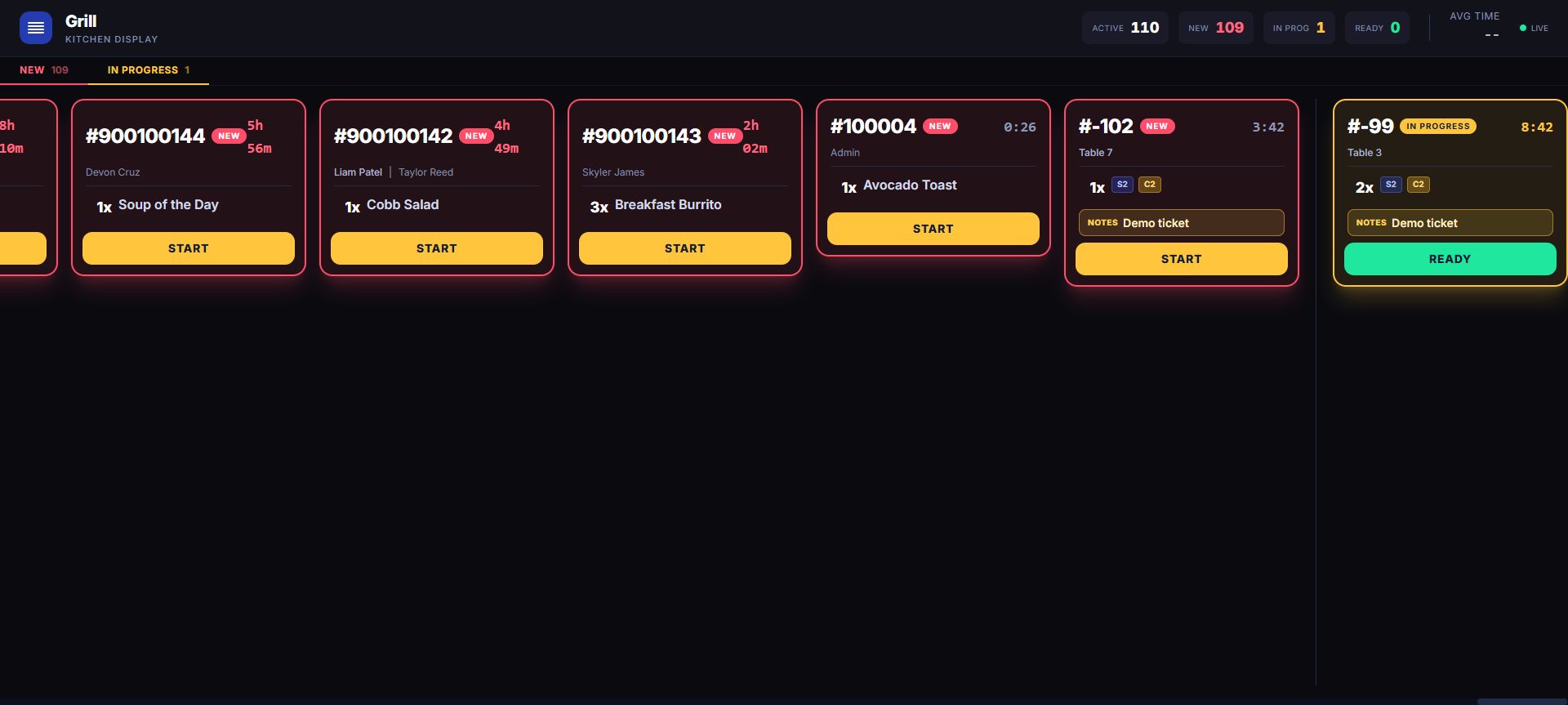
    The kitchen display carries elapsed time and detail through new, in progress, ready, and completed states.

  5. 05 · PAYComplete the tender

    Use the merchant's configured cash, card, split-tender or split check, tip, discount, and receipt procedure. Treat the local preauthorization ledger separately from any processor-backed hold.

  6. 06 · RECONCILERead the result

    Review the employee, customer, drawer, transaction, inventory consequence, and report behind the completed service.

OPERATING WORKFLOW · VERIFIED AGAINST PRODUCT BEHAVIOR

Product proof

The floor and kitchen share the order context.

These are real LiftedPOS product screens from the restaurant workflow. Open the seeded tenant to inspect the current controls, data, responsive behavior, and state changes yourself.

LiftedPOS restaurant floor map with tables and live service states
FLOOR + TABLES Work from the restaurant floor map and table state rather than treating every check like an anonymous retail cart.
LiftedPOS live kitchen display with active tickets and production states
KITCHEN DISPLAY Read the ticket identity, station, elapsed time, and production state visible on the live preparation board; use the source order when the team needs richer order detail.
Restaurant diligenceOpen the service, workforce, payment, and rollout controls

Restaurant floor and table management

Give front-of-house staff a live service map

LiftedPOS table records and the floor map keep table, capacity, position, and service state visible from seating through clearing. A connected waitlist carries the arrival-to-seating handoff into the same operation. During rollout, test concurrent staff activity, active or paid checks, permissioned floor changes, and service types that do not use a table.

Keep the detailed request on the source order and make the kitchen handoff explicit

The source order can retain configured modifiers and server-authoritative price deltas plus seats, courses, and kitchen notes. The production team sees ticket identity and state on its configured station view, then follows the restaurant's procedure for richer detail. Build modifier groups, defaults, prices, recipes, stations, tax, and availability from the real menu; notes support staff procedure but cannot replace allergen and cross-contact controls.

Route the right work to the right kitchen display

Configured item lines can route to kitchen, bar, grill, bakery, cold, expo, or another station; an unassigned item falls back to the default board. Tickets advance from new to in progress, ready, and completed. Paid-sale recall and forward-only pre-payment or QR work are different paths, so test counter, table, QR, correction, simultaneous-update, station, and expo scenarios before launch.

KITCHEN SAFETY BOUNDARY

Visibility supports procedure; it does not replace it.

LiftedPOS can preserve restaurant detail on the source order and display station-aware production state on the kitchen board. The restaurant remains responsible for confirming instructions, recipe accuracy, allergen policy, cross-contact controls, food-safety practice, equipment, staffing, and local requirements.

Let table QR orders enter a controlled staff queue

An authenticated operator can create a table-specific QR destination on the merchant's {company}.liftedpos.com subdomain. The guest builds a cart from the configured menu; the server resolves products, tax, and stored money values. The result is a server-priced pending order for staff review. An authenticated employee accepts or rejects it, the accepted order can move to the kitchen display, and payment is completed at the POS through the restaurant's configured staff procedure.

Connect recipes and component inventory to what was sold

A configured recipe connects the sold menu item to component quantities. Suppliers, purchase orders, receiving, counts, transfers, and low-stock visibility support the wider inventory workflow. Prove yields, units, modifiers, waste, voids, refunds, substitutions, receiving, and physical-count reconciliation with actual menu examples before relying on food-cost results.

Keep employees, permissions, cash, and reports in the close

Roles and permissions can separate discounts, refunds, drawer work, reporting, table changes, and payment operations. Register sessions retain opening cash, cash sales, refunds, paid-ins, drops, closing count, expected cash, and variance so the physical drawer can be compared with the transaction record.

When connectivity is lost, the documented LiftedPOS continuity path is cash only. A locally queued cash sale remains pending until server validation accepts and books its inventory, reporting, receipt, and drawer consequences. Restaurants define who owns retry and reconciliation and how the guest is informed during that interval.

Ring a realistic order, route it, tender it, and find the same event in transaction, drawer, inventory, employee, customer, and report views.

Use LiftedConnect for supported PAX payment context

LiftedConnect is the payment companion being qualified for supported LiftedPOS PAX A920 and A920 Pro deployments. Its verified on-device engine runs alongside BroadPOS through PAX POSLink 2 and excludes raw cardholder data from the allowlisted result. Raw cardholder data does not belong in LiftedPOS. The production backend handoff that connects a restaurant sale to that safe result must be enabled and proven before merchant use.

For a supported credit MID, processor tokenization is opt-in and defaults off. When the merchant and host support it, the engine can request a processor-issued token. Retaining that surrogate with the LiftedPOS transaction still requires the production backend handoff to be enabled and proven.

That qualified thread is the intended token foundation for future refunds and cards on file. Processor, MID, merchant configuration, host support, backend implementation, access control, and rollout determine what is enabled. Prove the real terminal, recovery, void, return, local preauthorization ledger, any separately integrated processor-backed hold, tip, and closeout path before launch.

Native guest + workforce system

Run the regulars and the roster inside the same LiftedPOS tenant.

Rewards, employee schedules, the time clock, timesheets, permissions, and employee messaging are native parts of LiftedPOS—not a collection of unrelated dashboards. The transaction, customer, employee, location, and shift context can stay close enough for an operator to understand both the guest relationship and the team that served it. Availability follows the merchant's module and plan configuration.

01GUEST

Native rewards that understand the check

When rewards are enabled, an identified customer can earn value after the sale commits. Each tenant uses one rewards mode: a spend-based cash-back wallet with tier settings, or punch programs for visits, products, or qualifying categories. Refund-aware logic can proportionally reverse cash-back and restore redeemed wallet value; a full refund reverses punch progress and revokes still-issued vouchers. A register-linked customer-facing rewards display can show wallet balance and tier progress for cash-back tenants, or punch progress and available vouchers for punch tenants.

Explore customer loyalty and rewards
02PLAN

Build employee schedules around the location

Build the board by day, week, or month. Create, edit, drag and resize shifts with employee, role, time, and notes attached; copy week accelerates repetitive setup. LiftedPOS flags overlapping shifts for confirmation and uses recent sales history to propose staffing coverage for review before acceptance.

See scheduling and shift controls
03TIME

Turn the time clock into an auditable record

The employee view keeps clock status visible and provides authorized manager clock controls. The timesheet controls add period and approval-state filters, an overtime summary, manager review, and Export CSV while keeping employee and date context close to the operating record.

Review time clock and timesheets
04TEAM

Keep employee messaging beside the work

Employee messaging through Team Chat keeps operational conversation in the same LiftedPOS tenant as roles, schedules, and location context. Teams can use Direct, Group, public Channel, and Announce conversations with membership-scoped history, unread state, mentions, reactions, editing, validated attachments, pinned messages, search, qualified presence, and typing state. Messaging coordinates the handoff while transaction, refund, schedule, timesheet, and administrative records retain authority in their dedicated workflows.

Explore Team Messaging Explore employee management

Restaurant POS rollout

Prove the hard service paths before opening night.

Bring the actual menu, floor, staff roles, preparation stations, devices, tender rules, and closeout procedure to the evaluation. A controlled pilot should surface the gaps while the team can still fix them.

SERVICEMap every order source

Test table, counter, takeaway, bar, QR intake, reopened work, cancellations, voids, refunds, and the handoff between employees.

MENUUse the difficult items

Build required and optional modifiers, price deltas, seats, courses, notes, recipes, taxes, unavailable items, and station routing.

PEOPLEExercise permission edges

Run host, server, bartender, cook, cashier, shift lead, receiver, and manager responsibilities with least-privilege roles.

DEVICESUse the rollout hardware

Verify workstations, kitchen screens, printers, drawers, network, customer display, and supported PAX configuration in place.

PAYMENTSRehearse exceptions

Test approval, decline, timeout, duplicate prevention, tip, split tender, local preauthorization-ledger state, any separately integrated processor hold, void, refund, disconnect, and reconciliation.

CLOSEOUTRead the whole night

Compare transactions, tickets, tender totals, cash count, tips, discounts, refunds, inventory consequences, and reports.

Straight station pricing

Read the whole station cost before the demo.

LiftedPOS software is $100 per month for the first station and $50 per month for each additional station. The standard dual-screen station and customer rewards display are $499.99 per station to purchase or $39.99 per month per station to lease. There is no long-term software contract: cancel anytime. Leased equipment must be returned to Lifted Holdings after cancellation or the customer is billed the full purchase price. Hardware and payment processing are separate; the payment terminal is not included in the published station arithmetic.

SOFTWARE · FIRST$100/mo
SOFTWARE · EACH ADDITIONAL$50/mo
DUAL-SCREEN HARDWARE · BUY$499.99/station
DUAL-SCREEN HARDWARE · LEASE$39.99/station/mo
Restaurant station cost examples
StationsSoftware / moBuy hardware onceLease hardware / moSoftware + lease / mo
1 station$100.00$499.99$39.99$139.99
2 stations$150.00$999.98$79.98$229.98
4 stations$250.00$1,999.96$159.96$409.96
01 · FLEXIBILITYCancel anytime. No long-term contract.

There is no long-term software contract. Cancel service when the operating plan changes instead of carrying a contract that no longer fits the restaurant.

02 · LEASE + RETURNKeep the hardware monthly. Return it when cancelled.

Leased equipment must be returned to Lifted Holdings after cancellation. Equipment that is not returned is billed at the full purchase price.

03 · COMPLETE SCOPEPrice the full rollout around the station.

The payment terminal and processing are separate from the published station arithmetic. Connectivity, installation, data migration, integrations, menu build, shipping, taxes, multi-location work, and specialized rollout services are separately scoped when applicable.

Examples use published standard station rates and simple arithmetic. Lease totals are monthly hardware charges; purchase totals are one-time hardware charges. They are not quotes for payment processing or separately scoped services.

Calculate your station plan

Restaurant POS questions

Clear operating answers before implementation.

What should a restaurant POS system connect?

A restaurant POS should connect the table or service context, menu item, modifiers, seat and course detail, kitchen routing, payment, employee, customer, cash drawer, inventory consequence, and report. The value comes from tracing one order through those records rather than counting disconnected feature names.

Does LiftedPOS include a kitchen display system?

LiftedPOS includes a kitchen display workflow with station-aware item routing, elapsed time, and ticket states that move from new to in progress, ready, and completed. The source order retains richer restaurant detail; the team should validate exactly which fields appear on each configured station view.

Can guests order from a table QR code?

A configured restaurant can generate a table-specific QR destination. Guests can browse the current menu and submit a server-priced cart. The order enters a pending staff queue where an authenticated employee can accept or reject it; an accepted order can be fired to the kitchen display.

Can guests pay inside the LiftedPOS QR ordering flow?

The guest submits a server-priced pending order for staff review. An authenticated employee accepts or rejects it, and payment is completed at the POS according to the restaurant's configured procedure.

How does LiftedConnect work for restaurant payments?

LiftedConnect's on-device engine runs with supported PAX A920 and A920 Pro devices, BroadPOS, and POSLink 2. The production LiftedPOS backend handoff remains a rollout qualification gate. Credit tokenization is opt-in and processor/MID dependent; connected token-backed refunds and cards on file are future workflows until the complete merchant path is enabled and proven.

How much does LiftedPOS cost for a restaurant?

Core software is $100 per month for the first station and $50 per month for each additional station. Standard hardware is $499.99 per station to purchase or $39.99 per month to lease. Hardware, payment processing, connectivity, implementation, and specialized rollout scope are separate.

Put this business through a real POS decision.

Use the buyer’s guide to test the fit, then build an assisted move around your stores, people, data, devices, and opening day.